
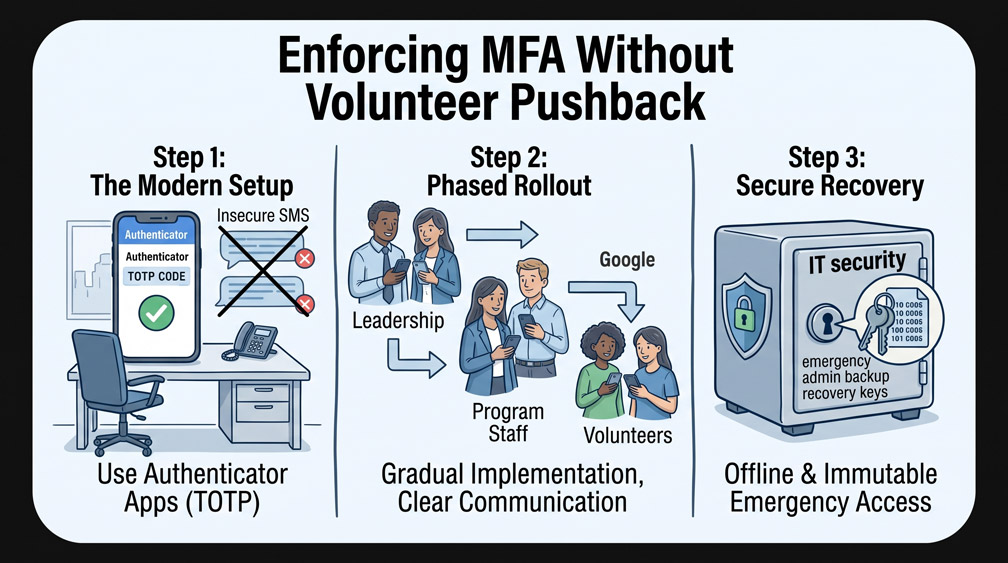
Multi-Factor Authentication (MFA) stops more than 99% of account compromise attacks, yet nonprofit leaders frequently hesitate to enforce it due to fears of volunteer pushback and login confusion. When implemented haphazardly, requiring verification codes can create operational friction and support delays. However, leaving donor records, financial portals, and email workspaces protected only by simple passwords violates cyber insurance requirements and exposes organizations to catastrophic takeovers.
Step 1: Moving Beyond Fragile SMS Text Verification
Many organizations begin by sending 6-digit verification codes via SMS text messaging. While better than passwords alone, SMS verification is vulnerable to SIM-swapping fraud and causes persistent headaches when volunteers travel or work in areas with poor cellular reception. Standardize your organization on modern authenticator applications like Google Authenticator, Microsoft Authenticator, or Bitwarden Authenticator. These apps generate time-based one-time passcodes (TOTP) directly on the device without requiring cell service.
Step 2: Executing a Phased Departmental Rollout
Do not enforce tenant-wide MFA overnight across every volunteer and staff member at once. Begin rollout with Executive Leadership and the Finance Department, as these accounts carry high-privilege access to bank accounts and root tenant settings. Once leadership documents the enrollment process and clarifies login behaviors, expand enforcement to full-time program staff. Provide volunteers with simple one-page setup sheets and offer dedicated 10-minute setup sessions during routine staff meetings.
Step 3: Safeguarding Offline Emergency Admin Recovery Keys
The single greatest operational fear associated with MFA enforcement is organizational lockout. If a global administrator loses or damages their phone, your nonprofit could face extended downtime. During the initial MFA setup of your primary global administrative account, generate and print offline emergency recovery backup codes. Seal these numeric codes in a tamper-evident envelope and lock them in the executive office safe, guaranteeing administrative access regardless of mobile device failures.
0 Comments