
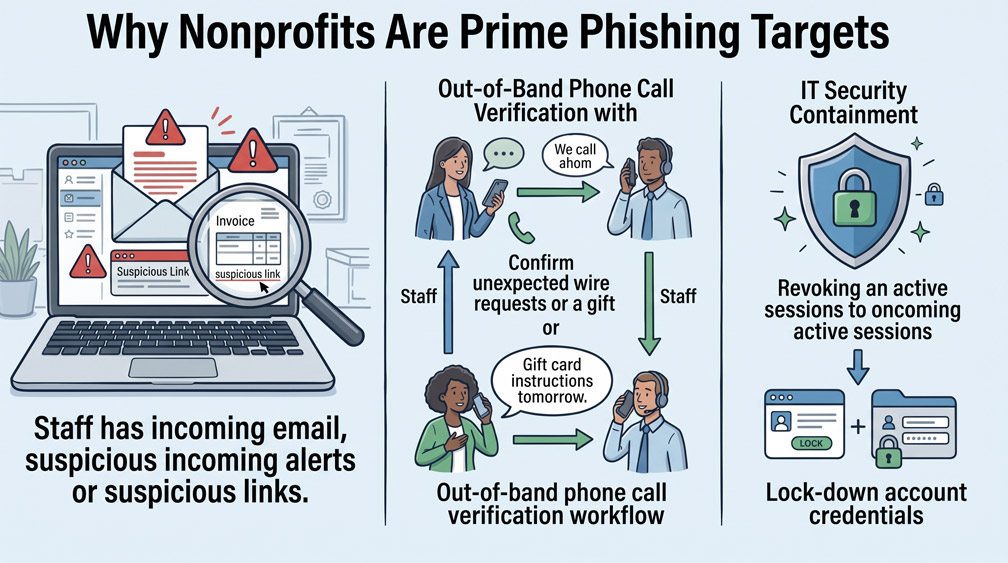
Nonprofit organizations frequently operate under the assumption that cybercriminals only target major corporate enterprises with large financial reserves. In reality, threat actors aggressively pursue community organizations specifically because they know grassroots teams operate with distributed, volunteer-heavy workforces and rarely enforce enterprise security training. Phishing emails mimicking executive directors, banks, or grantmakers represent the most common vector for unauthorized fund transfers and donor record breaches.
Step 1: Identifying High-Risk Email Impersonation Tactics
The majority of nonprofit phishing attacks rely on urgent social engineering rather than complex malware. Attackers frequently register lookalike domain names that differ by only a single character from your true organization address, sending emails that appear to originate from the Executive Director requesting immediate electronic gift card purchases or an urgent invoice payment. Standard operating protocol must mandate that any request involving banking changes, gift cards, or wire transfers requires an out-of-band verbal phone confirmation before action is taken.
Step 2: Inspecting Technical Sender Signatures and Domain Links
Staff and administrative volunteers must be trained to verify the true sender header rather than relying on the display name shown on their mobile device or desktop email client. Hovering over embedded links inside unexpected correspondence reveals the true destination URL. If an incoming email prompts staff to log into Microsoft 365 or Google Workspace to view an urgent document or invoice, they must never click the embedded link; they must navigate directly to the trusted service portal independently.
Step 3: Rapid Incident Containment Protocol
If an employee or volunteer clicks a malicious link and enters their login credentials, immediate containment prevents tenant-wide compromise. The user or IT administrator must immediately terminate all active browser login sessions from the cloud admin console, change the master password, and revoke any newly generated app passwords or secondary multi-factor authentication devices registered to the account.
0 Comments