
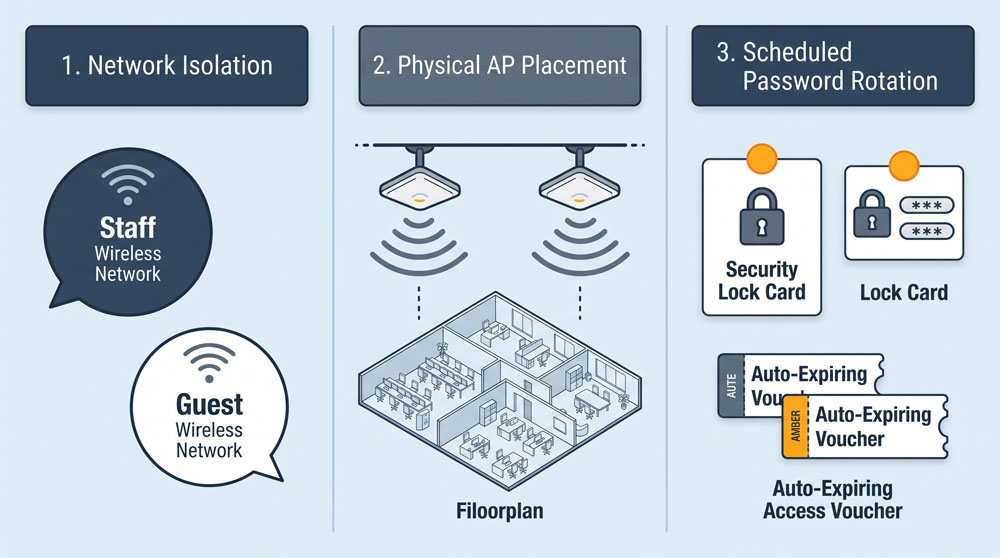
In community organizations, wireless networks carry everything from grant applications and client case files to community members checking email in the lobby. Too often, non-profits operate with a single residential router using a single shared password scribbled on a dry-erase board. This setup creates serious cybersecurity vulnerabilities and daily performance bottlenecks that disrupt mission delivery.
Separate Staff Operations from Guest Traffic
The golden rule of office Wi-Fi is absolute network segmentation. Your organization must maintain at least two distinct networks: a private, encrypted network for staff workstations and internal printers, and an isolated guest network for visitors, donors, and clients. Guest users should never have visibility into internal network traffic, shared storage folders, or administrative machines. Commercial-grade access points enable this separation with a single configuration toggle, shielding confidential client records from casual visitors.
Optimize Physical Access Point Placement
Sluggish internet in non-profit offices is rarely caused by poor incoming bandwidth; it is usually caused by poor access point placement. Stashing your wireless router inside a metal filing cabinet, under a reception desk, or behind heavy concrete firewalls cuts signal strength significantly. Mount access points high on central office ceilings away from large metal objects, thick structural columns, and microwave ovens. A centrally positioned unit delivers consistent, reliable speeds across all workstations without expensive hardware upgrades.
Protect the Network with Managed Credentials
Treating your staff Wi-Fi password as public knowledge exposes your entire internal network to risk. Avoid sharing the core network passphrase with temporary contractors, event volunteers, or visitors. Instead, configure the guest network with a captive portal or temporary rotating codes that expire automatically after a set number of hours. When an employee departs, make rotating the internal wireless password a standard step in the offboarding checklist to maintain institutional control.
0 Comments