
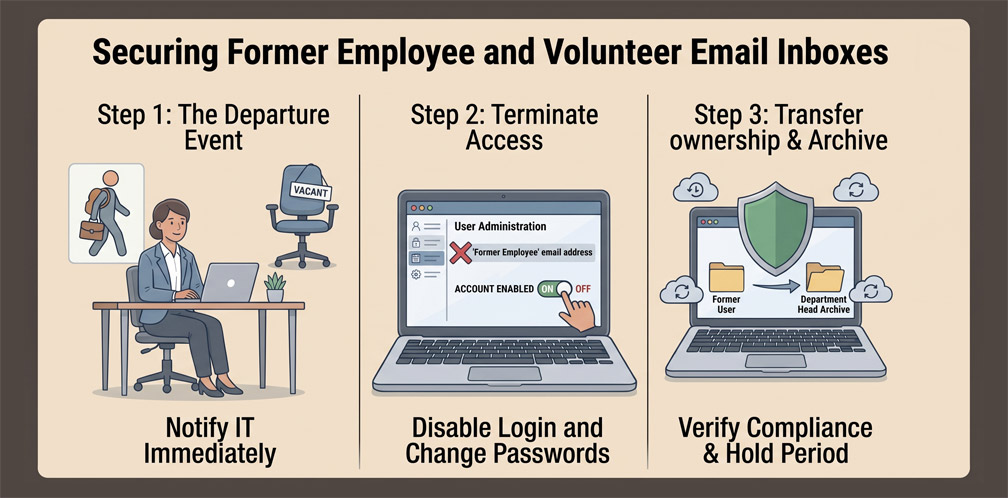
Nonprofits experience regular turnover among project coordinators, interns, and volunteer staff. When a team member steps down, leadership faces a dilemma: deleting their email account outright destroys years of vital donor conversations, grant verification records, and vendor receipts; however, leaving a dormant mailbox active without monitoring opens an unmonitored gateway for credential theft and account takeover.
Step 1: Immediate Session Revocation and Password Cycling
The moment an employee or volunteer departs, log into your Google Workspace Admin Console or Microsoft 365 Admin Center. Do not immediately delete the user profile. Instead, execute an immediate administrative session revocation to log the user out of all web browsers, smartphones, and desktop email applications. Change the master password and remove all personal recovery phone numbers and secondary emails registered to that user profile.
Step 2: Converting Mailboxes to Free Shared Archives
Avoid paying ongoing monthly software license fees for dormant mailboxes. In Microsoft 365, convert the departed user’s mailbox into a "Shared Mailbox," which frees up the commercial license while preserving the entire email history at zero cost. In Google Workspace, delegate inbox access to an active manager or export the user's historical mailbox to an organization Google Shared Drive using Google Vault or takeout tools before reallocating the license.
Step 3: Deploying Standard Forwarding and Auto-Responders
Community partners, grant officers, and donors will continue emailing the departed staff member's address for months. Configure an automated out-of-office message stating that the individual is no longer with the organization and directing all inquiries to an active staff inbox (such as [email protected] or a specific project manager). Establish an automatic mail forwarding rule to ensure no time-sensitive grant reporting deadlines are missed.
0 Comments